web authentication and authorization
Theory, Umbrella term: Identity and Access Management (IAM) - Access Control
libs
libs for rolling out your own auth system:
- BetterAuth ⭐️ (ppl seem to be recommending it more than Auth.js (NextAuth)) (2025-09 BetterAuth maintains Authjs and they recommend to start a project with BetterAuth)
- Passport.js
these help abstract away the different authentication processes between different 3rd party providers.
example repo
Providers
Identity-as-a-Service (IDaaS) and Customer Identity and Access Management (CIAM).
3rd party auth services that offload the trouble of implementing your own system
- Clerk
- doesn't just give you an API, also gives you pre-made UI components.
- Auth0 (paid/freemium) (bought by Okta) (feels dated and has steep price jumps)
- supabase auth: best for data ownership and cost effective if you already use supabase as DB
- firebase auth: low cost as well
- WorkOS: best for enterprise connections (SSO with Okta and Azure AD) but offer massive free tier of up to 1 million MAUs to get startups through the door.
- use for enterprise, for B2C there are better options
- authkit: free open-source authentication UI library built by WorkOS. can't decouple this UI kit from WorkOS
- Big cloud providers also have products: Microsoft Entra (External ID) and AWS Cognito.
- choose if you need low infrastructure cost or need native IAM integration with cloud provider.
they all offer a free tier of 25-50k monthly active users (except WorkOS 1M)
Clerk, Auth0 and WorkOS manages RBAC. You are able to define them in a dashboard UI
with firebase and supabase you have to define your own DB tables for roles and permissions and Supabase auth hooks are able to query the DB and embed that data into the JWT b4 sending to client.
since roles and perms live in the JWT you just have to decode the token once when the request comes in and add it to context.
steps to implement auth
- choose how user will authenticate
- user:password
- OAuth2 auth protocol access token
- OpenId Connect Id token
- XML SAML 💀
- SAML-SSO
- a mixture of the above
- Choose Sessions or jwt and refresh tokens to have user sessions.
- Persist sessionId or JWT in Cookies or LocalStorage.
Restoring session / State
to persist user data after site is closed and reopened, instead of storing user payload data in local storage (like I've done in past projects), Everytime user comes to website, make an API call (along with the user's cookie) and let server decide who the user is.
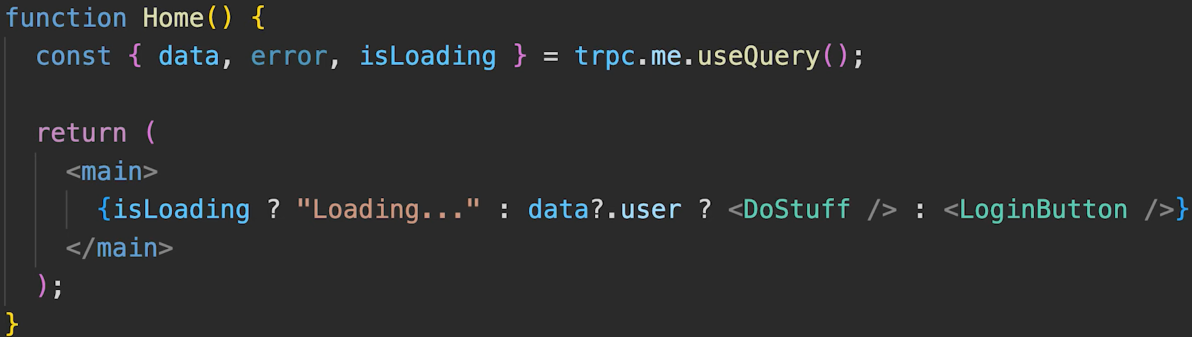
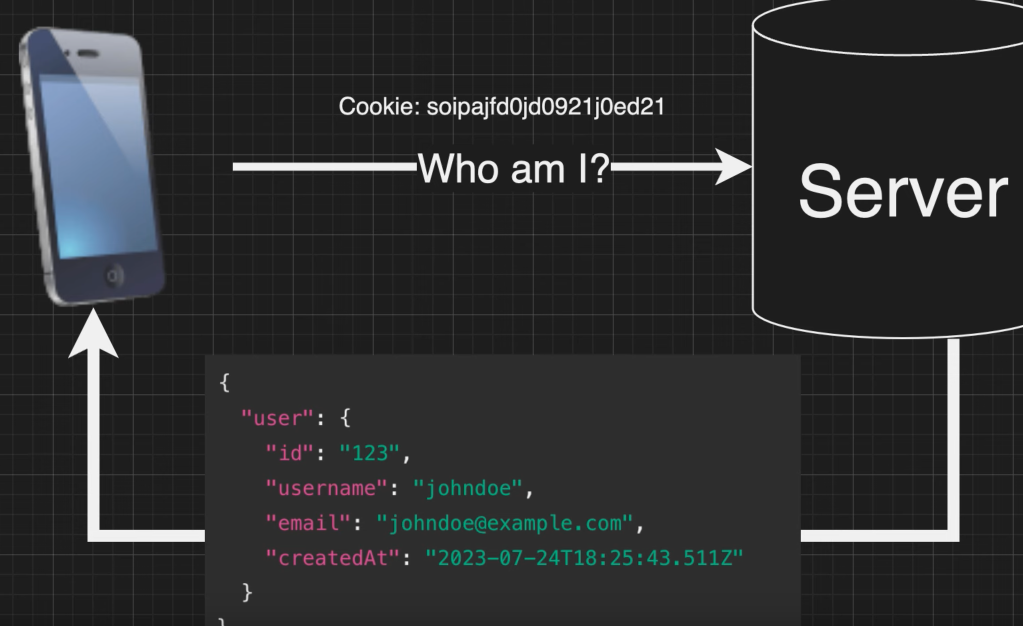
(remember we can't decode HttpOnly cookies in the browser)
ID token vs Access token
ID token: OpenID Connect (OICD)
Access token: OAuth2 auth protocol
Access tokens (also called Bearer tokens) authorizes an application to access resources or make actions on behalf of the user. For example: a Microsoft access token gives your app permission to access the users files in OneDrive or Microsoft Graph(API).
- are usually opaque strings not readable by clients.
- Are decrypted and inspected on the server, not on the client.
When a user logs in with Google using OAuth2 they generally have to consent to the specific resources the app asks for.
OpenId Connect is for granting id token that identifies the user. OpenId piggy backs on existing 3rd party auth servers to identify the user on our app. It is not interested on any 3rd party resource or access token.
ID tokens:
- identifies a user, generally used for authenticating. Knowing who the user is
- are not used to hit an API.
- are read by clients to identify the user.
OAuth2 is like giving an app a key, the key is useful but it doesn't tell the app who the user is or anything about him. OIDC is like giving the app a badge, the badge gives the client specific permissions but also providers basic info about the user.
ID tokens must be JWT, access token can be any string but usually is in JWT format.
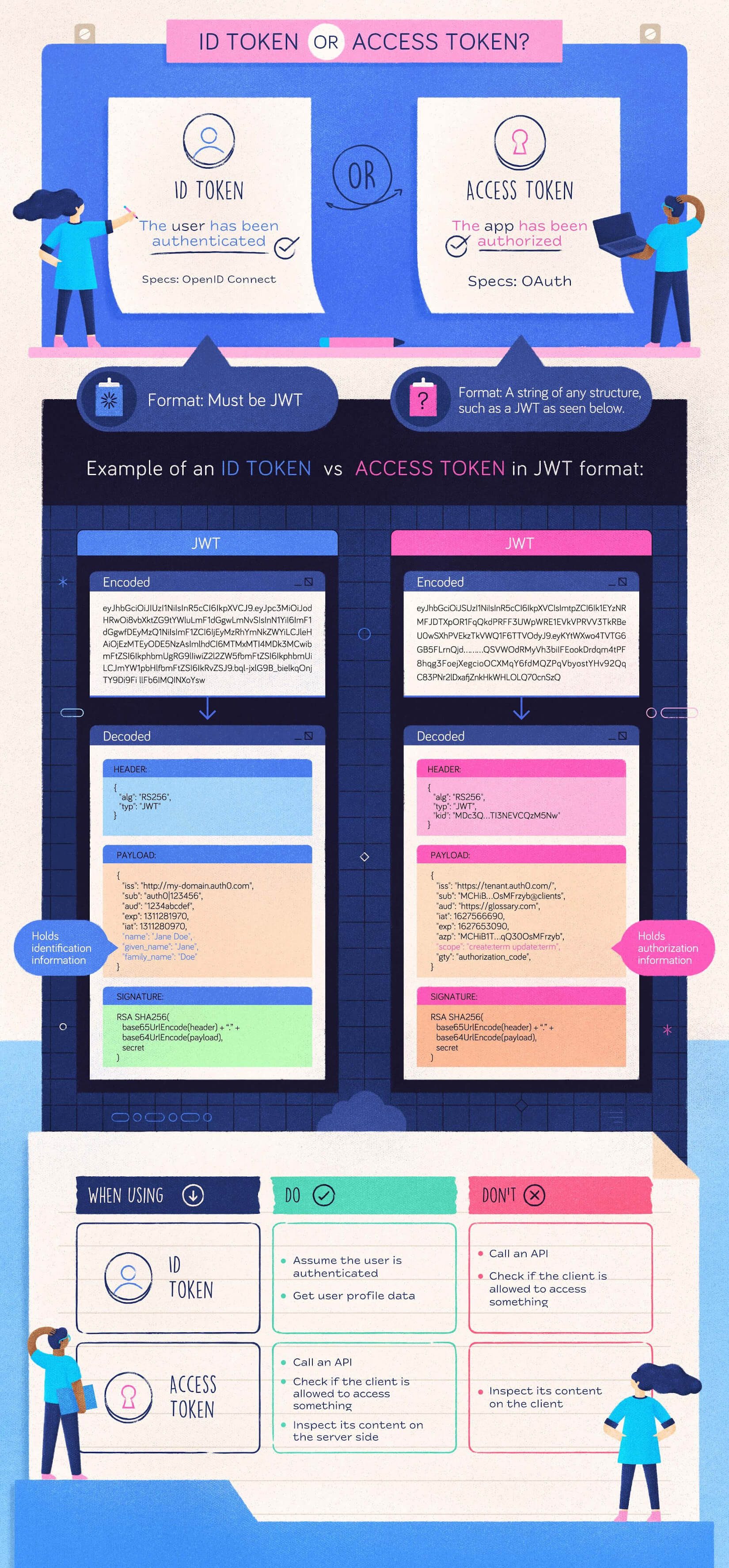
some more in depth videos of how Oauth and OIDC work
Mixed tokens
It's very common nowdays to implement a mix between ID tokens and access tokens in a single JWT.
For example in snapshot we have:
// Compressed JWT payload interface
export interface JwtPayload {
  sub: string; // subject (user ID) - standard JWT claim
  oid?: string; // organization ID - compressed from 'organization_id'
  rol?: string; // role (permission level) - compressed from 'permission_level'
  eml?: string; // email - compressed from 'email'
  iat?: number; // issued at - standard JWT claim
  exp?: number; // expiration - standard JWT claim
}
While the official OpenID Connect (OIDC) spec says "ID Tokens are for the client" and "Access Tokens are for the API," most modern developers find it redundant to send two different JWTs to the API.
subandemlare Identity claims (usually found in ID tokens).rolandoidare Authorization claims (usually found in Access tokens).
By combining them, your API doesn't have to make a second "Who is this?" request to a database or identity provider. It has everything it needs to perform a Permissions Check (like your CASL rules) immediately upon decoding the token.