learning react
my notepad
a React component are JS functions that return markup. Components must be named starting with a capital letter.
- in JSX you must close tags like
<br> {}to 'escape' into javascript.- components can't return multiple JSX tags. you have to wrap them in a shared parent, like a
divor an empty<>...</>wrapper. - to specify a CSS class name you use
className="", it works just like theclassattribute.
cheat sheet
https://github.com/typescript-cheatsheets/react
courses
- free code camp 11 hours https://www.youtube.com/watch?v=bMknfKXIFA8
- analyse this project https://github.com/Kennygunderman/react-blog from this video: https://www.youtube.com/watch?v=xaUj-NCDu7c
- https://www.w3schools.com/react/
learning react in 2023 blog:
- don't need to learn ab class components(deprecated)
- learn react query library
- instead of
create react app, consider using Vite for smaller and faster packages. or Next.js.
Next is the equivalent of SvelteKit for Svelte. it is a framework that does routing, has some data fetching and many other things.
5 min overview video
- you can install react by installing and configuring the npm packages
react react-dom webpack, or by using the cli toolnpx create-react-app. or creating a vite react project. - ES6 imports, just import React and ReactDOM.
- app component: function App(). stores all subcomponents and all our React. returns jsx
ReactDOM.render(App, document.getElementById('root')). imagine having a template index.html file with a single div root element. you find and replace / render all my react into it.- component: a building block that contains javascript and html logic. components can contain other components. components will always roll up to the App component. must return JSX.
- jsx is modified javascript syntax, that includes html. or more like modified html where you can insert javascript with
{}. - webpack bundles all react components into a single bundle.js file. that browsers can actually run (a lot of browsers can't run apps with multiple js files/modules/components)
- always have to export a component from it's file
- common pattern of list iteration:
example of having to load a json list. in jsx you use themap()js array method to return a component for each item in the array.
<ul>
	{bookList.map(book => <Book title={book.title} />)}
</ul>
common project structure
before it was common to have react single page applications, where you serve a single index.html file that loads all the React js and render everything client side.
now it is more common to use Nextjs (or other meta frameworks) to route URLs and render server side.
create-react-app project structure:
concepts
state
- state: dynamic form of storage that lives inside of our components. 'dynamic' because every time a state variable changes, the component gets flagged
2020 way to create state is with a useState hook:
import {useState} from 'react';
const [showBook, setShow] = React.useState(false);
(this line initializes a hook tofalse. i.e boolean false is stores in showBook and setShow is the setter function where I can set showBook to true or false)
this hook returns a value and a setter function. returned in an array of size 2.
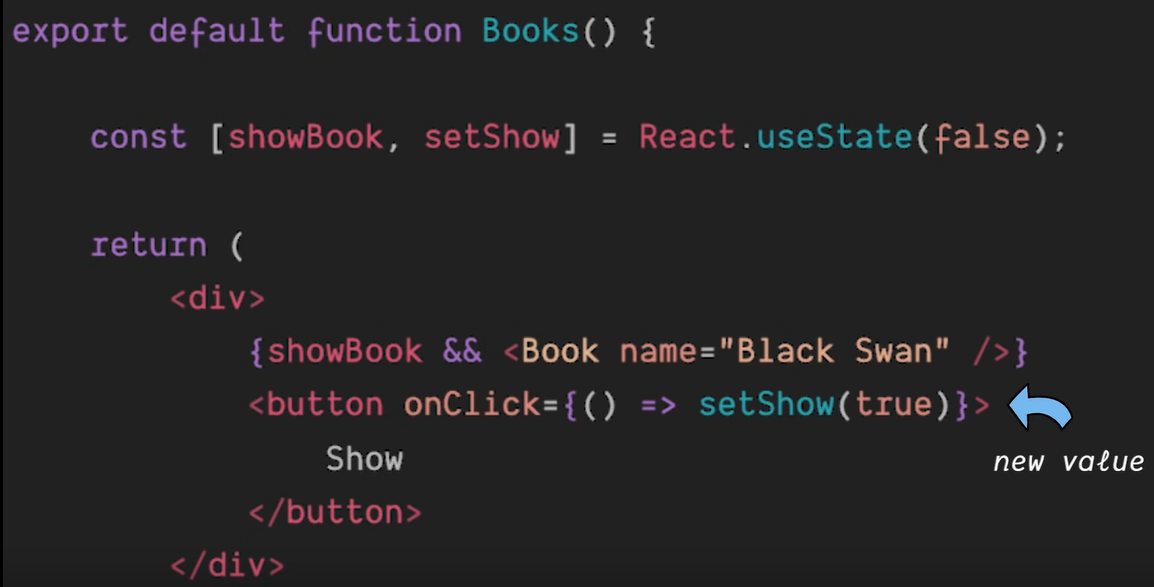
notice how we conditionally render the book component.{showbook && <Book />)}(i don't really like this but ok)
hooks
Functions that start with use are called hooks. useState is one.
other Hooks are:
- useEffect from [[#* life cycle effects.]]
- useContext (from the 'react' lib): fetches a Context
- useReducer
- useRouter: access the
routerobject inside any function component. this obj can redirect and do many route related things. - useMemo: compute a value and store it in a cache, if a value in the dependency array changes it recomputes the value.
you cannot call hooks inside conditional or loop, after a conditional return statement, in event handlers, in class components, inside functions passed to useMemo, useReducer or useEffect.
data flow
to pass data between components you use props. Parent component passes props to child components. if these props data change, state changes and trigger a reactive refresh / component rerender.
- the first argument of a component is always
props, which receive data from components above. this argument is a javascript object.
function Header(props) {
    console.log(props) // { title: "React 💙" }
}```
since it is an **object** you can do **object destructuring**:
```jsx
function Header({ title }) {
    console.log(title) // "React 💙"
}```
* parent components import child components. pass in custom parameters as props.

---
* React runs a virtual DOM,

when state of a component changes, that components gets flagged for a possible rerender. this is done with the virtual DOM, the virtual DOM is compared with the real DOM with a 'reconsciliation' algorithm to determine whether the page has to be updated or not.
DOM representation of a page's html as a hierarchical tree of objects. this structure allows devs to access and manipulate elements of the web page using languages like JavaScript.

## life cycle effects.
these are functions that are triggered when a component mounts, props or status updates or component unmounts.

These are managed with the `React.useEffect()` hook.
- first arg is a function that runs when the component mounts,
- if it ever runs again is determined with the second argument, which is an array of 'trigger' variables, that when their value changes, trigger the function call.
- finally, you can return a function inside the function that will run when the component unmounts. (yikes).

## Context, application state
React context and app state

## reducers
https://react.dev/learn/scaling-up-with-reducer-and-context

## rendering lists
use the `map()` function to transform an array into an array of `<li>` elements.
const listItems = products.map(product =>
return (
- {listItems}
- keyed elements
components like lists need to be keyed to let the react identify which elements to refresh when they change, instead of rerendering the entire list.
just like svelte keyed each
key is a special and reserved property in React. When an element is created, React extracts the key property and stores the key directly on the returned element. Even though key may look like it is passed as props, React automatically uses key to decide which components to update. There’s no way for a component to ask what key its parent specified.
event handling
onClickonChangefor input fieldsonSubmitfor forms
function MyButton() {
  function handleClick() {
    alert('You clicked me!');
  }

  return (
    <button onClick={handleClick}>
      Click me
    </button>
  );
}
naming conventions
- component names start with a capital letter.
onSomethingnames for props that represent eventshandleSomethingfor the function definitions which handle those events.
inmutability
by default when the state of a parent component changes, the parent as well as children re-render. even child components that weren't affected by the change.
special props
- children: passes components or elements as children to another component.
export default function Section({ level, children }) {
  return (
    <section className="section">
      <LevelContext.Provider value={level}>
        {children}
      </LevelContext.Provider>
    </section>
  );
}
jsx attributes
- ref: relate to a ref (useRef hook)
- key: for rendering lists. to distinguish elements correctly.
refs
refs reffer to actual dom elements (not virtual dom).
most common use case is when you want components to remember something but don't want to trigger a re-render.
import {useRef} from 'react';
const ref = useRef(0);
useRef return an object like this: {current:0}
so you can access the current value of your ref with ref.current this value is mutable.
you would often use ref when your component needs to "step outside" React and communicate with external APIs.
- storing timeout IDs
- storing and manipulating DOM elements,
- Storing objects that arent necessary to calculate the JSX.
best practices:
- treat refs as an escape hatch. Refs are useful when you work with external systems or browser APIs. if much of your app logic and data flow relies on refs, might want to rethink approach.
- Don't read or write ref.current during rendering.
the most common use is to access a DOM element.
You can point a ref to any value. However, the most common use case for a ref is to access a DOM element. For example, this is handy if you want to focus an input programmatically. When you pass a ref to a ref attribute in JSX, like <div ref={myRef}>, React will put the corresponding DOM element into myRef.current.Once the element is removed from the DOM, React will update myRef.current to be null
// uses refs to focus a text input
import { useRef } from 'react';

export default function Form() {
  const inputRef = useRef(null);

  function handleClick() {
    inputRef.current.focus();
  }

  return (
    <>
      <input ref={inputRef} />
      <button onClick={handleClick}>
        Focus the input
      </button>
    </>
  );
}
API
useful for defining components
ForwardRef
allows your component to expose a DOM node as a reference to the parent. Used alongside useRef.
you create a ref in parent component and if you want a child component that uses that ref (have the thing that the ref will point to) you use refForwarding by wrapping the component in React.forwardRef()
Preferred patterns
- that dude at Hearst kept recommending using the ternary operator for conditional rendering instead of && and linking this blog
custom hooks
This is a list of the most common custom hooks people write and use
useDebounce
for making an input wait
if the debounce isn't retriggered before the timeout, it returns a value after a certain amount of time.
useful for like search input useEffects that trigger a http request. using the debounce value it would trigger the effect after the user finished typing instead of after every keystroke.
Libraries
These are compatible with React
forms
Forms in JS
querying
- react query -> now tanstack query (bc now it's framework agnostic)
- Nextjs built in fetch() API